
COMPRESS PDF

How to compress a PDF on Android

Reduce the size of your PDFs right from your phone, keeping the text readable and without uploading the file online.

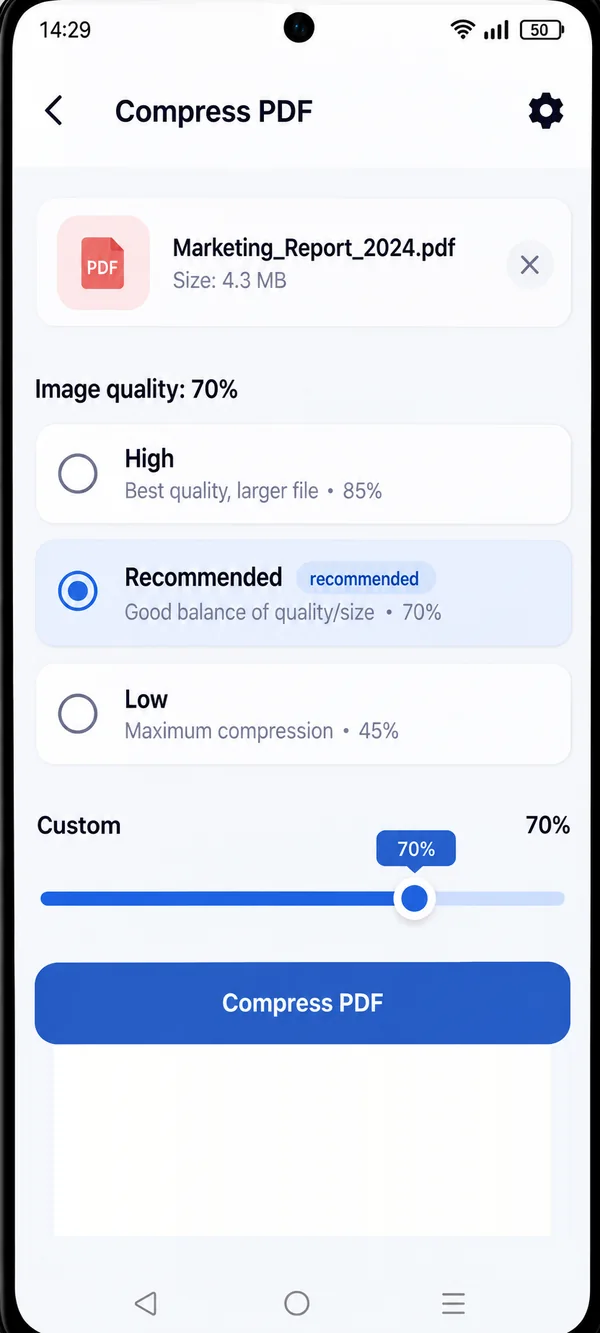
PDF HUB Compress PDF screen with image quality options

File too big for an email or a portal? With PDF HUB you shrink it in a few taps and decide how much to compress it.

CHOOSE THE QUALITY

Lighter, your way.

  • High · 85%

    The best image quality, with a slightly larger file.

  • Recommended · 70%

    The right balance between quality and size, for most cases.

  • Low · 45%

    Maximum compression, when size matters most.

Want an exact value? Use the “Custom” slider to pick the percentage yourself.

HOW IT WORKS

Compress a PDF in three steps.

  1. Open PDF HUB

    Launch the app on your phone and choose “Compress PDF”: no sign-up needed.

  2. Select the PDF

    Pick the document saved on your phone and see its size right away.

  3. Choose the quality and compress

    Select a level or adjust the slider, then tap “Compress PDF”.

High, Recommended and Low quality levels with the custom slider

You decide how much lighter.

See the file size before you start and pick the quality level that fits best: for an email, an online form or your archive.

  • File size always visible
  • Three ready-made levels, plus the custom slider
  • Text stays readable

WHY PDF HUB

Simple, and private.

  • Works offline

    Keep working even without an internet connection.

  • No account needed

    Open the app and start right away, no sign-up.

  • Files stay on your device

    Documents are processed on your phone, with no mandatory uploads.

GET STARTED

Lighten your PDF
in a few taps.

Get PDF HUB on Google Play.

Get PDF HUB on Google Play