

ORGANIZE PDF

How to organize a PDF on Android

Move, rotate, delete or extract the pages of a PDF right from your phone, without uploading the file online.

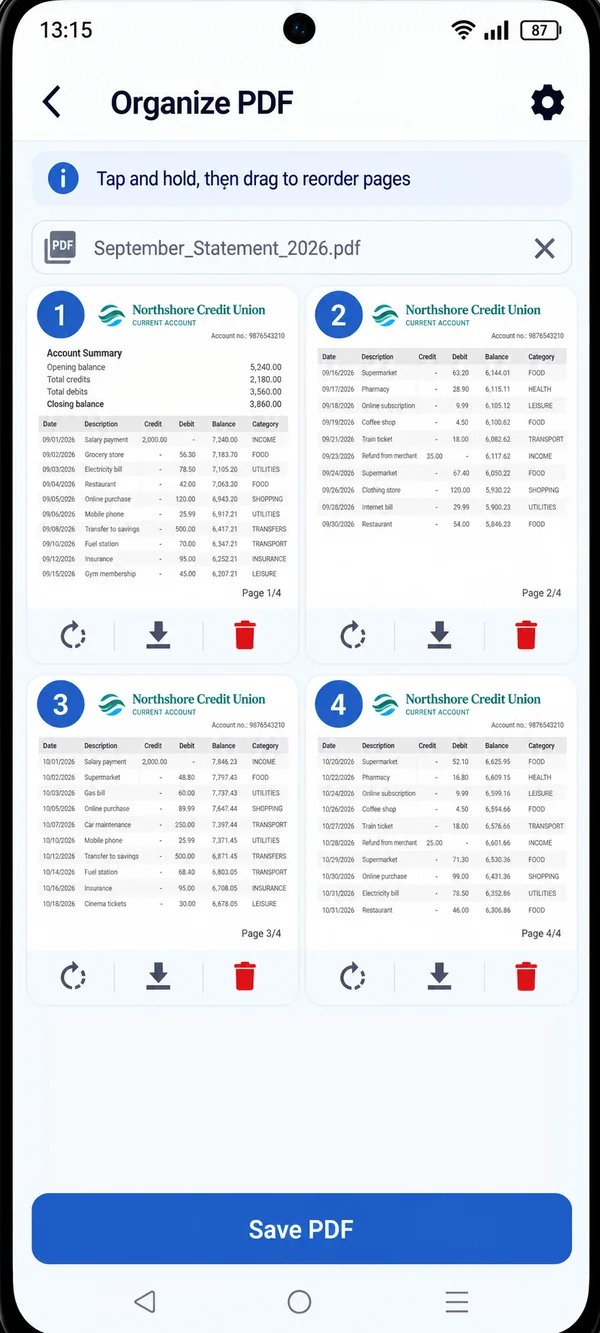
PDF HUB Organize PDF screen with page previews of a document

A page upside down, one too many, the wrong order: with PDF HUB you fix the document before sending it, no computer required.

WHAT YOU CAN DO

Every page, in its place.

  • Move pages

    Tap and hold a page, then drag it to change its position.

  • Rotate

    Straighten pages that are upside down or scanned sideways.

  • Delete

    Remove one or more pages you don’t need.

  • Extract

    Save a single page as its own PDF.

HOW IT WORKS

Organize a PDF in three steps.

  1. Open PDF HUB

    Launch the app on your phone and choose “Organize PDF”: no sign-up needed.

  2. Select the PDF

    Pick the document saved on your phone and see a preview of every page.

  3. Edit and save

    Move, rotate or delete pages, then tap “Save PDF”.

Page previews with controls to rotate, extract and delete

Every page under control.

Each page has its own preview and controls: you see the changes right away and save the document only when it’s exactly how you want it.

  • Preview of every page
  • Tap and hold, then drag to reorder
  • Rotate, extract or delete with a tap

WHY PDF HUB

Simple, and private.

  • Works offline

    Keep working even without an internet connection.

  • No account needed

    Open the app and start right away, no sign-up.

  • Files stay on your device

    Documents are processed on your phone, with no mandatory uploads.

GET STARTED

Fix your PDF
in a few taps.

Get PDF HUB on Google Play.

Get PDF HUB on Google Play