Merge files
Everything at a glance.
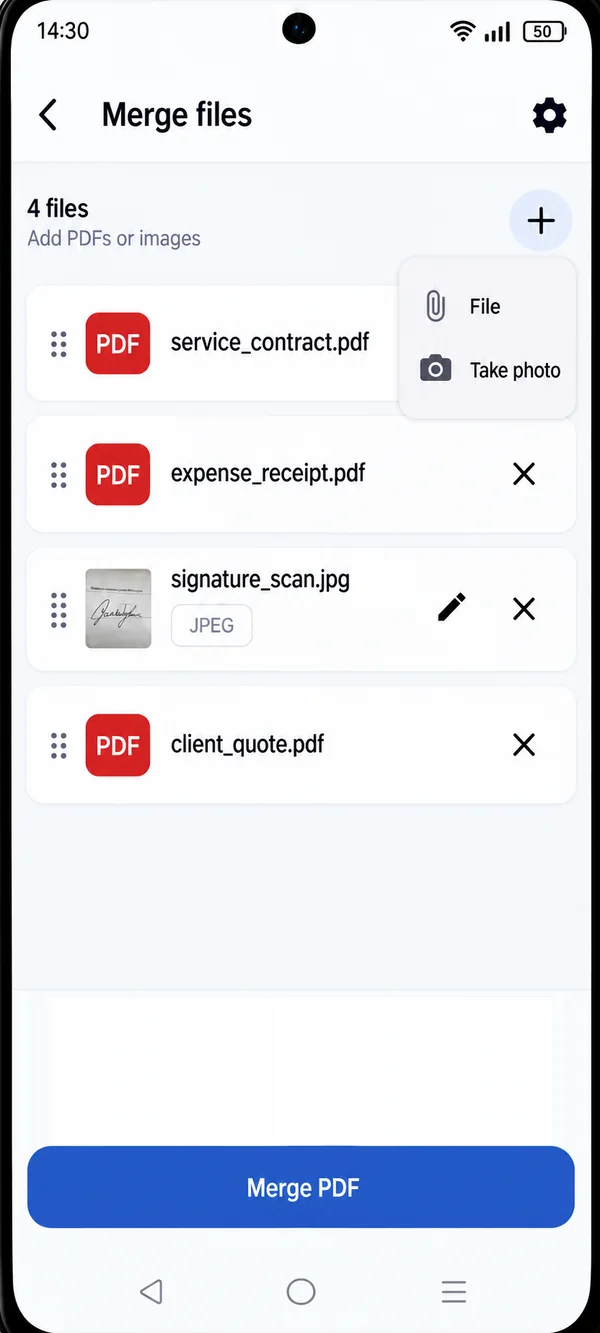
See the list of files you’re merging, change the order with a gesture and remove what you don’t need before creating the final PDF.
- PDFs and images in the same file
- Drag to reorder
- Add from files or take a photo
MERGE PDF
Combine multiple PDF documents right from your phone, in a few steps and without uploading your files online.
No more scattered attachments: with PDF HUB you gather everything into a single file that’s easier to email, upload to a portal or archive.
HOW IT WORKS
Launch the app on your phone and choose “Merge files”: no sign-up needed.
Add the documents saved on your phone. You can include images too.
Drag the files into the right sequence and tap “Merge PDF”.
Merge files
See the list of files you’re merging, change the order with a gesture and remove what you don’t need before creating the final PDF.
WHY PDF HUB
Keep working even without an internet connection.
Open the app and start right away, no sign-up.
Documents are processed on your phone, with no mandatory uploads.
GET STARTED
Get PDF HUB on Google Play.